

Testing Text Inputs: 15 Edge Cases Every QA Should Try
When you are testing text inputs, the happy path is the easy part — type “hello”, submit, done. The bugs live in the weird inputs: the empty string, the 10,000-character paste, the invisible Unicode character that deletes a username. Every form, chat box, and search field you ship will meet these inputs in production, usually at 2 AM.
This checklist gives you 15 edge cases every QA engineer should try on any text input, from a signup form to a chat app. The Quick Text Repeater Team uses these same inputs when stress-testing our own tools — and we built free utilities to generate most of them in one click.
Why Text Inputs Break
Text looks simple, but it travels through a gauntlet: keyboard encoding, browser normalization, frontend validation, network transport, backend sanitization, and database storage. Each layer can mangle, truncate, or reject input the previous layer accepted.
The classic failure modes are encoding mismatches (your database speaks latin1, your user speaks emoji), length limits enforced in one layer but not another, sanitizers that strip characters the UI promised to keep, and normalization that silently rewrites input — for example, NFKC normalization converts U+3164 (Hangul Filler) into a different code point or drops it entirely. Testing the edges is how you find which layer lies.
The Checklist: 15 Edge Cases for Testing Text Inputs
- Empty string. Submit with nothing typed. Does the backend agree with the frontend about whether it is allowed?
- A single space. Many “required field” checks pass on whitespace. Then the database stores a name that is one space long.
- 10,000 characters. Paste a huge block and watch for frozen UIs, truncated saves, or 500 errors. Generate one instantly with our text repeater — set any message to repeat 10,000 times.
- Emoji, including ZWJ sequences. Try 👨👩👧 (family emoji: seven code points, one visible glyph). It breaks naive character counters and fixed-width database columns alike.
- RTL text and mixed-direction text. Paste Arabic or Hebrew, then mix it with English in one line. Watch for reversed word order and broken cursor behavior.
- Zero-width characters. U+200B (zero-width space), U+2800 (Braille Pattern Blank), U+FEFF (byte-order mark). They are invisible, they survive some sanitizers, and they make “empty” checks lie. Grab test characters from our blank-text generator.
- Combining marks. Type “e” followed by U+0301 (combining acute accent). It renders as é but is two code points — length checks, search, and sorting may all disagree about it.
- Newlines. Multi-line paste into a single-line input. Does it truncate at the first \n, keep everything, or corrupt the layout?
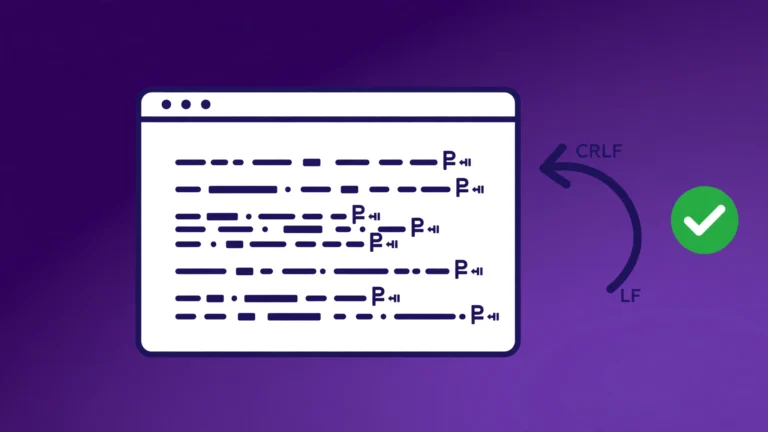
- Windows line endings. \r\n vs \n. A form that counts characters may count the \r on one platform and not on another.
- One 500-character word with no spaces. No wrapping points. Watch table layouts explode and containers overflow.
- Smart quotes and dashes from Word. ” ” ‘ ‘ — – … Users paste from Word constantly. If your system expects ASCII quotes, matching and search break silently.
- Non-breaking spaces (U+00A0). Looks like a space, is not a space. Splitting on ” ” misses it; it is CHAR(160) in Excel, which is why TRIM() never removes it.
- Boundary lengths: max, max−1, max+1. If the limit is 255, test 254, 255, and 256. The off-by-one error is the most classic bug in software for a reason. Verify exact lengths with our character counter.
- Null bytes and control characters. \x00 and friends. C-based backends may truncate the string at the null byte while the frontend shows the full text — a data-loss bug hiding in plain sight.
- HTML and script tags. <script>alert(1)</script> and <img src=x onerror=…>. If it executes, you have a stored XSS vulnerability, not a text bug.
Unicode Edge Cases: U+200B, U+2800, and Combining Marks
Unicode edge cases deserve their own section because they defeat the checks developers trust most. A “required” validator that rejects empty strings will happily accept U+2800 — it is a real character, just an invisible one. A username uniqueness check may treat “admin” and “admin”+U+200B as different users, which is a spoofing hole.
Combining marks add a second dimension: two strings can render identically while being different byte sequences. If your system compares, sorts, or deduplicates text, test with both the precomposed form (é, one code point) and the decomposed form (e + ́, two code points). And remember normalization: NFKC folds some characters away entirely, so a character that passes frontend validation can vanish server-side.
Length and Boundary Tests (and the Classic Off-by-One)
Length bugs cluster at boundaries. A field documented as “max 255 characters” might enforce 255 in the HTML maxlength, 256 in the API validator, and VARCHAR(255) in the database — three different answers, and the user discovers the strictest one by losing data.
Test the trio every time: one below the limit, exactly at the limit, one above. Then go big: a 10,000-character paste reveals performance cliffs (does the page freeze?), transport limits (does the request get rejected?), and storage behavior (silent truncation vs. loud error). For VARCHAR(255) specifically, repeat a 300-character string and check exactly where the cut happens — if it cuts mid-emoji, you have a second bug.
Copy-Paste From Word: Smart Quotes and Hidden Formatting
Real users do not type — they paste. And they paste from Word, Google Docs, PDFs, and web pages, each smuggling its own invisible cargo: smart quotes (” “), em dashes (—), non-breaking spaces, zero-width joiners, and occasionally entire style payloads.
The minimum test: paste a paragraph from Word into every text input you own and inspect what actually got stored, byte for byte. Common findings include curly quotes breaking exact-match search, NBSPs surviving “trim whitespace” logic, and line breaks from PDFs turning one field into three. A “paste as plain text” step in your test routine catches most of this in seconds.
Printable Checklist Summary
| # | Edge case | What to verify |
|---|---|---|
| 1 | Empty string | Frontend and backend agree |
| 2 | Single space | Not accepted as “filled” |
| 3 | 10,000 characters | No freeze, no silent truncation |
| 4 | Emoji / ZWJ sequences | Counters and columns handle them |
| 5 | RTL / mixed-direction | Order and cursor stay sane |
| 6 | Zero-width characters | “Empty” checks still work |
| 7 | Combining marks | Compare/sort/dedupe correctly |
| 8 | Newlines in single-line input | Truncate, keep, or reject — defined |
| 9 | \r\n vs \n | Counts match across platforms |
| 10 | 500-char word, no spaces | Layout does not break |
| 11 | Smart quotes / dashes | Search and matching still work |
| 12 | Non-breaking spaces | Split/trim logic catches them |
| 13 | max / max−1 / max+1 | No off-by-one |
| 14 | Null bytes / control chars | No silent data loss |
| 15 | HTML / script tags | Rendered as text, never executed |
Frequently Asked Questions
Where do I get invisible test characters?
Our blank-text generator produces U+2800, U+3164, U+200B, and other invisible characters with one-click copy — built exactly for cases 6 and 7 above.
How do I verify exact input length?
Paste the string into our character counter to confirm the precise code-point count before asserting against a boundary.
How do I build a 10,000-character test string fast?
Type any short message into our text repeater, set the count to 10,000, and copy the result — a stress string in under ten seconds.
Should these run manually or automated?
Both. Run them manually once for exploratory feel — you will notice UI quirks automation misses — then automate the boundary and encoding cases in your regression suite.
Do mobile keyboards change the results?
Yes. Some mobile keyboards trim trailing invisible characters or normalize input before the app sees it, so re-run the Unicode cases on real devices, not just desktop.
Most of these edge cases need purpose-built test strings — generate them in seconds with our free text tools and stop hand-typing test data.
3 Comments
Comments are closed.